skip to main |
skip to sidebar
As a player adds their name and score to the High Score Board the list of highest scores must be resorted into order. The highest score list should have the highest high score at the top and the lowest high score at the bottom.
In the code I have set three integer variables and three character strings, followed by a set of if and else statements to sort the order of the score board once a new high scorer’s name and score have been added to the list.

The code for this is similar to collision detection when the ball is travelling to the left, using i+1 instead of i-1, as used when the ball is travelling to the left.
 x1 = (bricks1[i+1].posx – bricks1[i+1].halfwidth) – prevballx – gameball.radius + 4;
Again, check that the collision occurs between the top and bottom of the brick, add one to the hit count each time a brick is hit, add ten to the score when a brick is deleted, reverse the ball direction, calculate the final ball position and check if the level has been completed.
Collision on the side of a brick only occurs when the ball is travelling sideways and the brick next to it no longer exists. I need to create an if statement, which says if the ball is travelling to the left, but do not check if the brick being hit is the left-most brick (as there is no brick to the left of it to be hit), then check the side collision.
 x1 = prevballx – (bricks1[i-1].posx + bricks1[i-1].halfwidth) – gameball.radius – 4;
t = (float)*1 / (float)gameball.velx;
y1 = (int) (t*(float)gameball.vely);
tempballposx = prevballx + x1;
tempballposy = prevbally + y1;
//Check that the collision is between the top and bottom of the brick
if (bricks1[i-1].posy + bricks1[i-1].halfheight + 7 >= tempballposy && bricks1[i-1].numberhits < level)
{
bricks1[i-1].numberhits ++; //Add one to hit count
if (bricks1[i-1].numberhits == level); //Set up to check if brick hits equals level number then a sound effect could be added later
}
score = score+10; //Add 10 to the score each time a brick is deleted
gameball.velx = - gameball.velx; //Reverse the direction of the ball
gameball.posx = tempballposx + (int) ((1.0-t)*(float)gameball.velx); //Calculate the final ball position
gameball.posy = - tempballposy + (int) ((1.0-t)*(float)gameball.vely); //Calculate the final ball position
checklevelcomplete(); //Check if the level has been completed
Each time the ball and the brick collide the player receives 10 points. The 10 points are added to the score in the bottom-right of the game play window.
To understand how to create the High Score Board I needed to research this topic and how score boards are created for computer games. The scores need to be saved in a separate text file. The file is loaded into the structure of the memory at the beginning of the game.
I have structured the text files as follows:
Name (3 characters) Tab Score
To write the headings, “High Score Board”, “Name” and “Score” to the screen I used the sprintf code. I’ve also used the sprintf code in printing the text from the separate file to the screen.
To read the information from the separate file I have used the fscanf code. I began by pointing the computer to the relevant file and have created an integer variable to deal with the scores and a character variable to deal with the names. The code used then opens the relevant file and reads it: fileHandle – fopen(“highscores.txt”, “r”);
I then read the string, tab across, integer and create a new line. This points to the name and score strings. A copy of the name and score are then created. This process is repeated three times to then be used in displaying the names and scores of the three highest scorers.
In order to create a countdown I needed to code a timer, again I needed to carry out some research to find the best way to do this. To work out that a second in time has passed the processor clicks need to be counted. If the number of processor clicks is greater than the number of clicks per second, then a second in time has passed.
The timer may also be used if I add a time counter to the game. This is not necessary and may make the scoring system more intricate. I may add a time counter to the game if I manage to get the rest of the essential coding done within the expected time limits.
To create the timer I have included the header file time.h and used the clock code in my game code.
As the game needs to include text I have carried out some research into the font options available using OpenCV and then carried out some experiments with these.
Text items include:- Initialisation
- Score
- Countdown
- Game over
- High score board
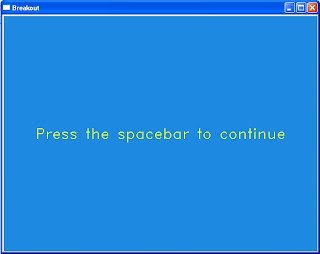 This is an example of the initialisation screen and the font used throughout the game.
Working from the initial state transition diagram that was presented in the project proposal and presentation, I coded eight states for the game. The states take the player through the game, linking one state to the next depending on the outcome of each game. For example, the game over state may lead to the enter high score state (if the score is greater than the lowest high score) or to the view high score state (if the score is lower than the lowest high score).
The states are:
- Initialisation
- Startup
- Countdown
- Playing
- Game over
- Congratulations
- Enter high score
- View high score

 x1 = (bricks1[i+1].posx – bricks1[i+1].halfwidth) – prevballx – gameball.radius + 4;
 x1 = prevballx – (bricks1[i-1].posx + bricks1[i-1].halfwidth) – gameball.radius – 4;

