A similar method is used when saving the high scores, as the method for reading the high scores. Instead, to save the high scores the external file is written to, using “fileHandle = fopen(“highscores.txt”,”w”);”.
This line of code opens the relevant file for writing and I have then used “fprintf” to write a string (the player name), tab a space, an integer (the player score) and created a new line. To end this command, I have then used the code line “fclose(fileHandle);”.
Showing posts with label high score board. Show all posts
Showing posts with label high score board. Show all posts
Thursday, 24 July 2008
Sort the high scores
As a player adds their name and score to the High Score Board the list of highest scores must be resorted into order. The highest score list should have the highest high score at the top and the lowest high score at the bottom.
In the code I have set three integer variables and three character strings, followed by a set of if and else statements to sort the order of the score board once a new high scorer’s name and score have been added to the list.

In the code I have set three integer variables and three character strings, followed by a set of if and else statements to sort the order of the score board once a new high scorer’s name and score have been added to the list.

Monday, 16 June 2008
High score board
To understand how to create the High Score Board I needed to research this topic and how score boards are created for computer games. The scores need to be saved in a separate text file. The file is loaded into the structure of the memory at the beginning of the game.
I have structured the text files as follows:
Name (3 characters) Tab Score
To write the headings, “High Score Board”, “Name” and “Score” to the screen I used the sprintf code. I’ve also used the sprintf code in printing the text from the separate file to the screen.
To read the information from the separate file I have used the fscanf code. I began by pointing the computer to the relevant file and have created an integer variable to deal with the scores and a character variable to deal with the names. The code used then opens the relevant file and reads it: fileHandle – fopen(“highscores.txt”, “r”);
I then read the string, tab across, integer and create a new line. This points to the name and score strings. A copy of the name and score are then created. This process is repeated three times to then be used in displaying the names and scores of the three highest scorers.
I have structured the text files as follows:
Name (3 characters) Tab Score
To write the headings, “High Score Board”, “Name” and “Score” to the screen I used the sprintf code. I’ve also used the sprintf code in printing the text from the separate file to the screen.
To read the information from the separate file I have used the fscanf code. I began by pointing the computer to the relevant file and have created an integer variable to deal with the scores and a character variable to deal with the names. The code used then opens the relevant file and reads it: fileHandle – fopen(“highscores.txt”, “r”);
I then read the string, tab across, integer and create a new line. This points to the name and score strings. A copy of the name and score are then created. This process is repeated three times to then be used in displaying the names and scores of the three highest scorers.
Wednesday, 11 June 2008
Font experimentation
As the game needs to include text I have carried out some research into the font options available using OpenCV and then carried out some experiments with these.
Text items include: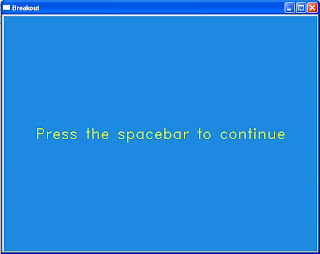
This is an example of the initialisation screen and the font used throughout the game.
Text items include:
- Initialisation
- Score
- Countdown
- Game over
- High score board

This is an example of the initialisation screen and the font used throughout the game.
Subscribe to:
Posts (Atom)
