skip to main |
skip to sidebar
I have carried out some research into the use of sound in game and have decided to add sound to the game, to make playing the game a more interesting experience, as it involves more of the senses.
Times in the game that may benefit from sound:
- Ball and border collision
- Ball and paddle collision
- Ball and brick collision
- Brick explosion
Other times during the game when sound effects or music could be used:
- Losing a “life”
- Completing a level
- Congratulation state
- During the countdown
- Introduction to the game
In order to create a countdown I needed to code a timer, again I needed to carry out some research to find the best way to do this. To work out that a second in time has passed the processor clicks need to be counted. If the number of processor clicks is greater than the number of clicks per second, then a second in time has passed.
The timer may also be used if I add a time counter to the game. This is not necessary and may make the scoring system more intricate. I may add a time counter to the game if I manage to get the rest of the essential coding done within the expected time limits.
To create the timer I have included the header file time.h and used the clock code in my game code.
As the game needs to include text I have carried out some research into the font options available using OpenCV and then carried out some experiments with these.
Text items include:- Initialisation
- Score
- Countdown
- Game over
- High score board
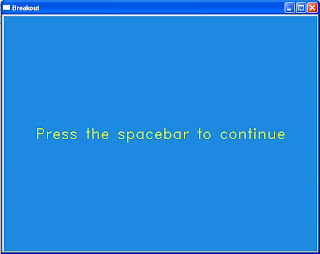 This is an example of the initialisation screen and the font used throughout the game.
Working from the initial state transition diagram that was presented in the project proposal and presentation, I coded eight states for the game. The states take the player through the game, linking one state to the next depending on the outcome of each game. For example, the game over state may lead to the enter high score state (if the score is greater than the lowest high score) or to the view high score state (if the score is lower than the lowest high score).
The states are:
- Initialisation
- Startup
- Countdown
- Playing
- Game over
- Congratulations
- Enter high score
- View high score


