skip to main |
skip to sidebar
Each brick needs properties for positioning, collision detection, design information and keeping a record of how many times each brick has been hit.
Each brick has the following properties:
- Position in x
- Position in y
- Width
- Height
- Half width
- Half height
- Number of times brick has been hit
- Main colour
- Darker colour
- Lighter colour
To draw each brick, set it’s position and three colours (to create the pseudo 3D effect), then draw it to the screen if the number of times it has been hit is lower than the level number.
 pos x = position in x
pos y = position in y
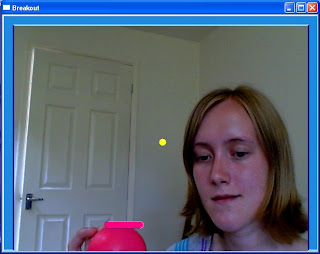 The design ideas for the ball and testing suggested that the ball should be yellow, to ensure that it stands out against the background of the game board, the video image of the players.
The ball has the same diameter (in pixels) as the height of the paddle, to keep continuity and for aesthetic purposes. A small white rectangle has been added to the yellow ball to create a pseudo 3D effect and add detail to the ball.
The ball has been coded to move only within the borders of the game board. This required some mathematical work, to calculate the velocity of the ball, it's projected position from an initial state to the next during one time step, the distance the ball travels in the x and y axis in a single time step and when it should rebound from the border, accounting for the radius of the ball.
 The paddle consists of a rectangle and two circles, one at either end of the rectangle. This gives the paddle curved edges, which makes it more visually interesting than just a rectangular design.
The paddle is created using a number of variables. These variables are used to calculate the position of the paddle, the distances it can travel along the x axis inside of the game board and the way in which it interacts with the ball, through collision detection.
The design ideas for the paddle include a highlight and lowlight stripe in the code to add detail and to help create the pseudo 3D effect.
 Having considered various screen sizes for the game I have decided to use a 640x480 window, as this is the largest available and will make the game easier to see.
Design ideas:
- Blue border along the top and the two vertical sides of the screen
- No border along the bottom of the screen, as falling off the bottom of the screen leads to the players losing a "life"
Borders:
- 20 pixels in total in height (for top border) and in width (for vertical borders)
- Lighter blue and darker blue lines add pseudo 3D effect
- Each highlight or lowlight is made of three lines of varying length, to create the pseudo 3D effect
 pos x = position in x


