The IOCT Masters Showcase Event at The Phoenix on Friday, 25th of July 2008 offered an opportunity to demonstrate the game and get feedback from players.
Feedback was extremely positive, with people staying to play the game for a while. Comments suggested that the game was interesting to play and once you had started playing you didn’t want to stop, and also suggested it would be better to play the game on a faster computer in order for the game to run slightly smoother. This is an issue I was already aware of and was just demonstrating the game on the laptop I have been using to code it on. Ideally, I would have demonstrated the game on a desktop computer, however, I did not have access to one during the event.
Other comments suggested that people liked the design of the bricks in the different levels, as I had created posters to show print screens of the different levels. People were keen to play the game and interested in how the object detection worked, asking about how the movement of the AIBO ball (used as I only had a limited space in which to demonstrate my work) controlled the paddle on the screen.
Showing posts with label brick design. Show all posts
Showing posts with label brick design. Show all posts
Wednesday, 30 July 2008
Monday, 30 June 2008
Brick properties
Each brick needs properties for positioning, collision detection, design information and keeping a record of how many times each brick has been hit.
Each brick has the following properties:
To draw each brick, set it’s position and three colours (to create the pseudo 3D effect), then draw it to the screen if the number of times it has been hit is lower than the level number.
 pos x = position in x
pos y = position in y
Each brick has the following properties:
- Position in x
- Position in y
- Width
- Height
- Half width
- Half height
- Number of times brick has been hit
- Main colour
- Darker colour
- Lighter colour
To draw each brick, set it’s position and three colours (to create the pseudo 3D effect), then draw it to the screen if the number of times it has been hit is lower than the level number.
 pos x = position in x
pos y = position in y
Brick design
Having considered the measurement of the game play area, the number of pixels between the left and right borders and the number of pixels between the top border and the top edge of the paddle, I tried to divide the play area to include a suitable number of bricks. I have decided to have a brick grid consisting of 12 x 7 bricks.
Each of the three levels in the game has a different brick design pattern, these are:
Level 1 = Green and purple checkerboard
Level 2 = Rainbow in horizontal colour-bands
Level 3 = White with green squares spelling “IOCT”
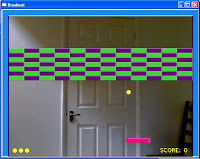 Level 1

Level 2
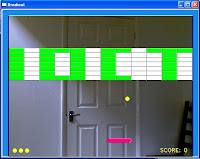
Level 3
Each of the bricks uses three colours, a main colour, a highlight colour and lowlight colour. The use of three colours creates the pseudo 3D effect, used throughout the game.
Each of the three levels in the game has a different brick design pattern, these are:
Level 1 = Green and purple checkerboard
Level 2 = Rainbow in horizontal colour-bands
Level 3 = White with green squares spelling “IOCT”
 Level 1
Level 2

Level 3
Each of the bricks uses three colours, a main colour, a highlight colour and lowlight colour. The use of three colours creates the pseudo 3D effect, used throughout the game.
Levels
There are three levels in the game. Each level must be completed, by deleting all of the bricks in the level before the player can progress to the next level. Each level has a different brick design, to make the difference between the levels clear visually.
The levels also differ in the ease with which they are completed. This increases the difficulty rate of each level as the player progresses through the game.
Level 1 = Each brick hit once then it's deleted
Level 2 = Each brick hit twice then it's deleted
Level 3 = Each brick hit three times then it's deleted
The levels also differ in the ease with which they are completed. This increases the difficulty rate of each level as the player progresses through the game.
Level 1 = Each brick hit once then it's deleted
Level 2 = Each brick hit twice then it's deleted
Level 3 = Each brick hit three times then it's deleted
Subscribe to:
Posts (Atom)
