skip to main |
skip to sidebar
In order for the player to know when the ball collides with a brick I have decided to make this clear through the use of visual and audio techniques. This will give the player(s) an indication that a brick has been hit and that the computer has recognised this. Cracks have been coded to represent bricks which have been hit but have not yet been hit enough times to be deleted (the brick has not been hit the same number of times as the level number).
The range of audio and visual effects that occur when a brick is hit include:
Level 1: Brick hit first time = Explosion noise, brick disappears
Level 2: Brick hit first time = Collision noise, cracks appear on the brick
Level 2: Brick hit second time = Explosion noise, brick disappears
Level 3: Brick hit first time = Collision noise, cracks appear on the brick
Level 3: Brick hit second time = Collision noise, another crack appears on the brick
Level 3: Brick hit third time = Explosion noise, brick disappears
This requires the code used for the brick disappearing, first set of cracks and second set of cracks and also the explosion and collision sound effects.
I have carried out some research into the use of sound in game and have decided to add sound to the game, to make playing the game a more interesting experience, as it involves more of the senses.
Times in the game that may benefit from sound:
- Ball and border collision
- Ball and paddle collision
- Ball and brick collision
- Brick explosion
Other times during the game when sound effects or music could be used:
- Losing a “life”
- Completing a level
- Congratulation state
- During the countdown
- Introduction to the game
The collisions to the sides of the brick when the ball is travelling from above are the same as when the ball is travelling from below.
Collision on the side of a brick only occurs when the ball is travelling sideways and the brick next to it no longer exists. I need to create an if statement, which says if the ball is travelling to the left, but do not check if the brick being hit is the left-most brick (as there is no brick to the left of it to be hit), then check the side collision.
 x1 = prevballx – (bricks1[i-1].posx + bricks1[i-1].halfwidth) – gameball.radius – 4;
t = (float)*1 / (float)gameball.velx;
y1 = (int) (t*(float)gameball.vely);
tempballposx = prevballx + x1;
tempballposy = prevbally + y1;
//Check that the collision is between the top and bottom of the brick
if (bricks1[i-1].posy + bricks1[i-1].halfheight + 7 >= tempballposy && bricks1[i-1].numberhits < level)
{
bricks1[i-1].numberhits ++; //Add one to hit count
if (bricks1[i-1].numberhits == level); //Set up to check if brick hits equals level number then a sound effect could be added later
}
score = score+10; //Add 10 to the score each time a brick is deleted
gameball.velx = - gameball.velx; //Reverse the direction of the ball
gameball.posx = tempballposx + (int) ((1.0-t)*(float)gameball.velx); //Calculate the final ball position
gameball.posy = - tempballposy + (int) ((1.0-t)*(float)gameball.vely); //Calculate the final ball position
checklevelcomplete(); //Check if the level has been completed
 Collision detection to the top edge of the brick when the ball is travelling from above.
y1 = previous ball posy – bricks1[0].posy – bricks1[0].halfheight – radius – 1
t = y1/vely
x1 = t*velx
tempballposx = previous ball posx – x1
tempballposy = previous ball posy – y1
for (i=0; i<12; i++)
if (tempballposx >= bricks1[i].posx – halfwidth && tempballposx =< bricks1[i].posx + halfwidth)
if (bricks1[i].numberhits < level) //Check brick still exists
bricks1[i].numberhits++ //Add one to hit count
vely = - vely //Reverse ball direction
ballposx = tempballposx + (1-t)* velx //Check final ball position
ballposy = tempballposy + (1-t)* vely //Check final ball position
 Collision detection to the base edge of the brick when the ball is travelling from below.
y1=(bricks1[0].posy-bricks1[0].halfheight) – previous ball position – radius – 1
t = y1/vely
x1 = t*velx
tempballposx = previous ball posx + x1
tempballposy = previous ball posy + y1
for (i=0; i<12;i++)
if (tempballposx>= bricks1[i].posx – halfwidth && tempballposx =< bricks1[i].posx + halfwidth)
if (bricks1[i].numberhits < level) //Check brick still exists
bricks1[i].number hits++ //Add one to hit count
vely = - vely //Reverse the ball direction
ballposx = tempballposx + (1-t)* velx //Check final ball position
ballposy = tempballposy + (1-t)* vely //Check final ball position
To create the collision detection on the bricks, I need to calculate a number of collision detection circumstances, these include:
- ball travelling from below, hits base of brick
- ball travelling from above, hits top of brick
- ball travelling from below, hits right side of brick
- ball travelling from below, hits left side of brick
- ball travelling from above, hits right side of brick
- ball travelling from above, hits left side of brick
Each time the ball and the brick collide the player receives 10 points. The 10 points are added to the score in the bottom-right of the game play window.
The ball must be projected on to the paddle and the point at which the ball would have contacted the paddle and this point must be calculated. As the paddle has curved edges I tried to angle the edges of the paddle collision detection lines, however, having tried to use the intersection of two lines I could not get the collision detection process to work as desired. I have decided to extend the line across the top of the paddle, so that the collision occurs whenever the ball collides within the length of the paddle.
paddley = top edge of paddle in the y axis
Test:
paddley > position in y – radius
 y1=paddley – ball position y + radius
t=y1/vely
x1=t*velx
Test condition, ensure ball hits between paddle edges:
previous ball position x + x1 > paddle position – paddle half width
&&
previous ball position x + x1 < paddle position + paddle half width
ball position x = previous ball position x + x1
ball position y = previous ball position y + y1
vely=-vely
ball position x = ball position x + (1-t)*velx
ball position y = ball position y + (1-t)*vely
Test:
maximum y < position in y + radius
 y1=maximum y – ball position – radius
t=y1/vely
x1=t*velx
ball position x=previous ball position x + x1
ball position y=previous ball position y + y1
vely=-vely
ball position x=ball position x + (1-t)* velx
ball position y=ball position y + (1-t)* vely
 x1=maximum x - ball position x – ball radius
 t=x1/velx
y1=t*vely
ball position x=previous ball position x + x1
ball position y=previous ball position y + y1
velx=-velx
ball position x=ball position x + (1-t)* velx
ball position y=ball position y + (1-t)* vely
The intermediate point is the collision point.
 ball position x = previous ball position x – x1
ball position y = previous ball position y + y1
ball position x = ball position x + (1-t)* velx //end ball position in x equals whole distance to be travelled minus distance travelled before intermediate point, multiplied by velocity in x
ball position y = ball position y + (1-t)* vely //end ball position in y equals whole distance to be travelled minus distance travelled before intermediate point, multiplied by velocity in y
Collision detection needs to be calculated, as the ball contacts and needs to rebound from the borders around the game board, the paddle and the bricks.
This works on the physics equation:
speed=distance/time
To calculate the movement of the ball after collision I need to know how much time it has taken to reach the collision, as a proportion of a time step. The remaining time in the time step after the collision is used by the bal l travelling in the opposite direction.
x1=ball position x – minimum x + ball radius //calculate distance ball travelled before collision

t //amount of time step as proportion, between 0 and 1
y1 //distance travelled in y before collision
velx //total distance moved (real and projected) in x in time step
vely //total distance moved (real and projected) in y in time step
t=x1/velx //distance travelled in x in proportion to whole distance to be travelled in time step
y1=t*vely //calculate distance travelled in y before time step, multiply whole distance the ball would travel in time step by proportion already travelled
velx=-velx //reverse direction
The movement of the ball is based on the mathematical principles of trigonometry and Pythagoras theorem, so these principles were researched. h = overall velocity of the ball (the hypotenuse)
x = x component of the ball velocity
y = y component of the ball velocity
0 = theta, angle of the path of the ball, set to a randomly generated number between 35o and 55o
x = sin 0 * h
y = cos 0 * h
Trigonometry:
Trigonometry can be used to calculate angles. In right-angled triangles, where there is a hypotenuse, the term SOHCAHTOA can be used:
- SOH = sine = opposite/hypotenuse
- CAH = cosine = adjacent/hypotenuse
- TOA = tan = opposite/adjacent
Pythagoras theorem:
In a right-angled triangle, the hypotenuse is equal to the sum of the other two sides. Often written as: a2+b2=c2
Random number generation:
For the ball to leave the paddle at the start of each game using a different angle, a random number between two set boundary numbers should be generated and control the ball’s initial movement. The boundary numbers are 35o and 55o as these were considered suitable angles between which to project the ball from the paddle.
To create a random number between these boundaries the srand code is implemented to initialise the random number generator, using processor clicks, as these values are different every time the program runs. The boundary angles are then set and the angle must be between these values, it is then multiplied by 2pi/360, and converted to radians. The ball velocity in x and y are then calculated and the remainder of the random number is divided by 2, giving an answer of 0 or 1, allowing the x component to be reversed, changing to direction the ball takes as it leaves the paddle.
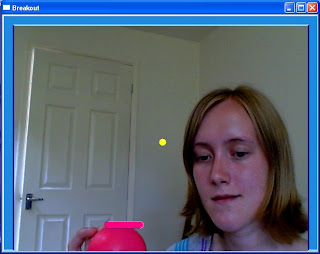 The design ideas for the ball and testing suggested that the ball should be yellow, to ensure that it stands out against the background of the game board, the video image of the players.
The ball has the same diameter (in pixels) as the height of the paddle, to keep continuity and for aesthetic purposes. A small white rectangle has been added to the yellow ball to create a pseudo 3D effect and add detail to the ball.
The ball has been coded to move only within the borders of the game board. This required some mathematical work, to calculate the velocity of the ball, it's projected position from an initial state to the next during one time step, the distance the ball travels in the x and y axis in a single time step and when it should rebound from the border, accounting for the radius of the ball.
 The paddle consists of a rectangle and two circles, one at either end of the rectangle. This gives the paddle curved edges, which makes it more visually interesting than just a rectangular design.
The paddle is created using a number of variables. These variables are used to calculate the position of the paddle, the distances it can travel along the x axis inside of the game board and the way in which it interacts with the ball, through collision detection.
The design ideas for the paddle include a highlight and lowlight stripe in the code to add detail and to help create the pseudo 3D effect.
 To design the cracks I tried a variety of designs on a printscreen of the bricks, using Microsoft Paintbrush. Once I had chosen the brick crack preferred design, I then calculated the pixels which were part of the crack and coded this using the cvLine command. The cracks are created by coding a series of small lines.
 The code is divided into three sections, one for each crack. In level two cracks one, two and three appear on the first collision. In level three cracks one and two appear after the first collision and crack three appears after the second collision.


